
Documentation as Code - Can Infrastructure teams adopt and why should they?
Documentation as Code, what exactly does that mean? According to Writethedocs.org "Documentation as Code (Docs as Code) refers to a philosophy that you should be writing documentation with the same tools as code". That sounds simple until you put it in the context of Infrastructure.


Traditionally, Infrastructure teams are not programmers and most of the documentation that we do is done in Word, Powerpoint and Excel and Michelin is no different (for now). To make the shift and create documentation with the same tools as coders will be quite a challenge. Not impossible, but it will be a challenge.
The first thing we need to address is the 'WHY'. Why should Infrastructure teams change to doing Documentation as Code instead of just doing documentation the way we always have?
- Documentation drifts from reality
- Knowledge is scattered across tools and teams
- Teams rediscover decisions instead of reusing them
- Architecture decisions are hard to find, validate and govern
- Documentation lacks traceability and review
In summary, architecture is continually evolving but our documentation does not.
How can Documentation as Code help to solve this problem?
- It can improve quality and consistency by applying code practices - templates, reviews, and CI checks - to documentation.
- It can scale with teams and automation by making documentation searchable, reusable, and integrated with pipelines and tooling.
- Documentation as Code turns documentation into reliable input data for AI, not just human-readable text - making AI Agents safe, more accurate, and more useful in infrastructure environments.
The last point above is one of the primary drivers in my opinion. I want our Infrastructure documentation to be easily consumable by AI Agents. In order for this to happen we need to change our methods and start doing our documentation in markdown format and leverage standard software tools.
Background
I needed to create a starting Git project for our Infrastructure team's documentation. I knew that one of the major ways of consuming our documents was via a WEB browser. I created a Git project with the name of 'documentation' and then added Mkdocs to the project. Mkdocs provided me a way to organize our documents that would be created in markdown and allowing consumption via WEB browser. What types of documents should we have ? I knew I wanted Architecture Decision Records (ADRs), Roadmaps, Runways and Solution Documentation at a minimum. Knowing this allowed me to create the following structure with mkdocs in my project.
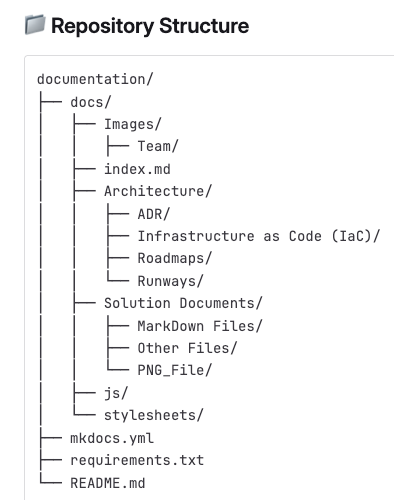
I had a structure layed out where we could manage all of our documentation that was being done in markdown.
For those who want to use a browser to view our documentation it looks like this:
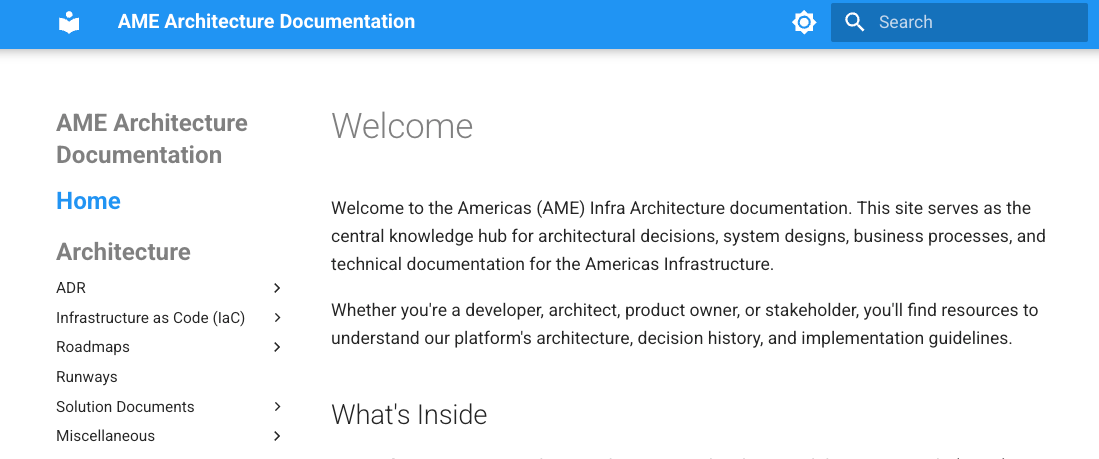
Now that I had the base structure setup in our project, I was ready for the next step.
Where to Begin?
At Michelin I led the effort to begin this change within our Infrastructure team, the question in front of me was how I start this change of behavior within the team? I chose to start the learning with Git from the command line for the team. It wasn't an in depth training session but rather a high-level view of the most common Git commands. My reasoning behind this was that if they knew the underlying, base commands, once we provided training with an IDE they would know what was happening 'under the covers'.
While the list of commands might not be what everyone considers the definitive list of important commands, it is what has worked for us. Some of those commands were:
- git checkout <name>
- git push
- git add
- git commit -m "message"
- git switch <name>
- git clone <url>
- git merge
- ...
Once we completed the Git training, we introduced the team to the IDE interface. We showed and used Visual Studio (VS) Code as the IDE to allow the team another way manage the files within our git project.
Next Step
Now that the team had some knowledge of git commands from the command line and had some familiarity with the IDE it was time to put it to practical use. I chose to have the team start with creation of ADRs. To me this was the simplest way to introduce creation of a document in markdown format and then manage it via a git repository. The challenge in front of me was do I just let them create everything from scratch or do I provide an ADR template to start from. I chose to start with an ADR template as I felt this would be the path of least resistance. A portion of this template is shown below:
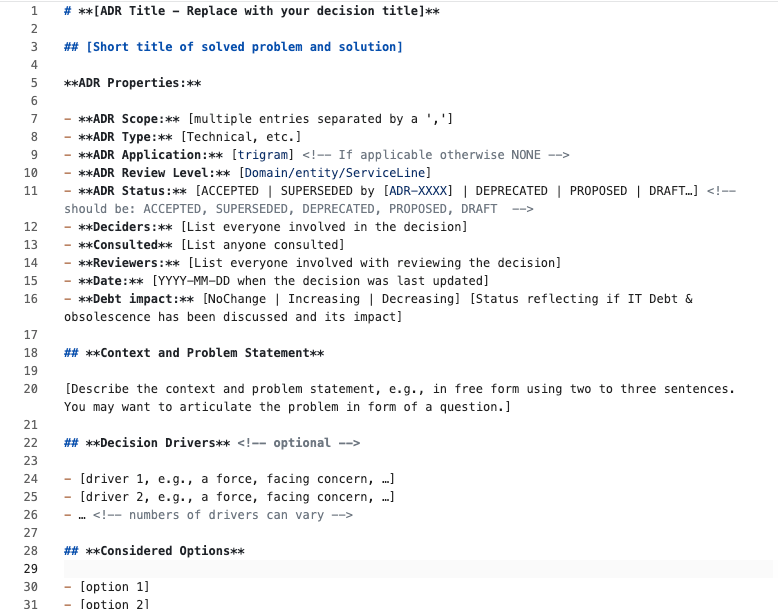
By providing a template the user just needs to complete the fields, which are the same fields as on their previous Word document or Sharepoint page.
The way we create a new ADR is to create a new folder under Architecture/ADR and copy the template file to this new folder. Once the file is there we rename it to index.md. This folder will hold the actual ADR as well as any images needed for the ADR.
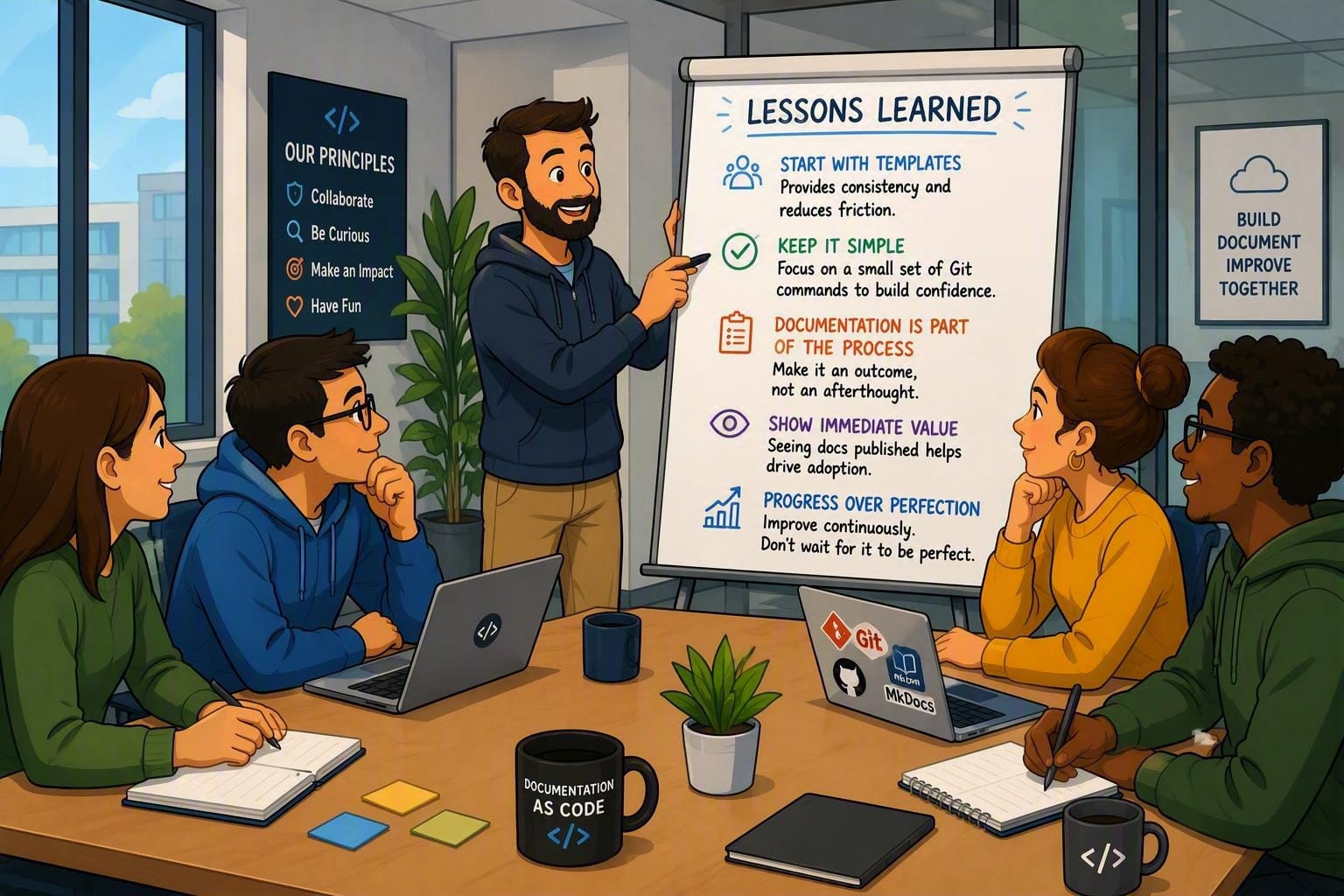
Lessons Learned from the First Months
Introducing Documentation as Code to an Infrastructure team was not primarily a technical challenge. The larger challenge was changing long-established habits and ways of working.
Some of the lessons we learned included:
- Start with Templates
Most of the teams was comfortable creating content when they begin with a known structure. Providing ADR templates significantly reduced resistance because team members could focus on the decision being documented rather than worrying about document formatting.
- Keep the Git Workflow Simple
While Git offers many advanced capabilities, new users only needed a small subset of commands to become productive. Focusing on the most common daily tasks helped prevent people from becoming overwhelmed.
- Documentation Must Be Part of the Process
One of the biggest risks is treating documentation as a separate activity that happens after the work is completed. Instead, documentation needs to become a deliverable of the architecture and implementation process itself.
- Show Immediate Value
Adoption increased once team members could see their documentation published automatically through MkDocs and accessible through a browser. Seeing documentation move from a markdown file to a professional website helped demonstrate the value of the approach.
- Progress Over Perfection
Not every document needed to be converted immediately. We focused on creating new documentation using the Documentation as Code approach while gradually improving existing content over time.
Benefits We Have or Will Soon See
- Improved Decision Traceability
Before Documentation as Code, architecture decisions were often buried in emails, meeting notes, PowerPoint presentations, or SharePoint pages. ADRs in markdown provide an easy way to discover:
- What decision was made
- Why it was made
- What alternatives were considered
- Who participated in the decision
This reduces the need to repeatedly revisit the same discussions months later.
- Better Collaboration Across Teams
Having all documentation stored in a shared repository encourages collaboration between Network, Data Center Applications, End User Experience, Security, and Operations teams.
Instead of maintaining separate copies of documents, everyone works from the same source of truth.
- Version History Becomes a Strategic Asset
One unexpected benefit is that Git provides a complete audit trail.
We can see:
- Who changed a document
- When it was changed
- What changed
- Why it changed
This has proven valuable when revisiting architecture decisions or understanding how a solution evolved over time.
- Documentation Reviews Improve Quality
Merge Requests naturally introduce peer review into the documentation process.
Documents receive feedback before publication, improving:
- Accuracy
- Consistency
- Technical quality
- Governance compliance
Documentation quality improves because multiple people review the content.
- Documentation and Architecture Stay Aligned
Traditionally, documentation is created and then slowly becomes outdated.
With Documentation as Code:
- Updates are easier
- Changes are visible
- Documentation becomes part of normal engineering work
The effort required to keep documentation current is significantly reduced.
- Searchability Improves Knowledge Discovery
Markdown content is easy to search across an entire repository.
People can quickly locate:
- ADRs related to a technology
- Previous design decisions
- Similar solution patterns
- Existing standards
This reduces duplicated work and encourages reuse of proven solutions.
- Foundation for Automation
Once documentation exists as structured text in Git, opportunities for automation begin to emerge:
- Automatic website generation
- Link validation
- Quality checks
- Navigation generation
- Diagram generation
- Compliance reporting
Documentation becomes part of the engineering platform rather than a standalone artifact.
- AI Readiness
Traditional documents are optimized for humans to read.
Documentation as Code creates structured, machine-readable information that can be consumed by:
- AI assistants
- RAG platforms
- Knowledge agents
- Search systems
- Governance tools
The result is more accurate AI responses because the information is version-controlled, reviewed, and maintained as part of the engineering lifecycle.
- Shift from "Documentation" to "Knowledge Management"
Perhaps the biggest benefit is a mindset change.
We are no longer creating documents for the sake of documentation. We are creating a knowledge platform that captures architecture decisions, standards, roadmaps, and operational guidance in a format that can be consumed by both people and machines.
That shift has the potential to deliver value long after a project or technology has been replaced.
What's Next?
While this effort was started in Americas region the opportunity now is to influence our Group teams that this is what we need to do globally. Show the simplicity of this way and show the value gained by doing it this. As we experienced here locally, the biggest challenge will not be technical but rather a mindset change in how information is documented and why.
Conclusion
Documentation as Code is not really about markdown, Git, or MkDocs. Those are simply tools. The real value comes from treating documentation as an engineering artifact that is versioned, reviewed, searchable, reusable, and increasingly consumable by AI systems. Once documentation becomes part of the engineering lifecycle rather than an afterthought, the quality and usefulness of that knowledge improve dramatically. Yes, I think that Infrastructure teams can and should adopt to documentation as code. There are no major technical challenges to overcome, just mindset changes. In order to stay relevant in this day and age we all need to be open to mindset changes constantly.