
From Scripts to an Industrialized Automation Ecosystem at Michelin
Follow Michelin’s journey from handcrafted scripts on shared servers to a secure, governed automation ecosystem built on standardization, code review, spec-driven AI, CI/CD, Kubernetes and observability.

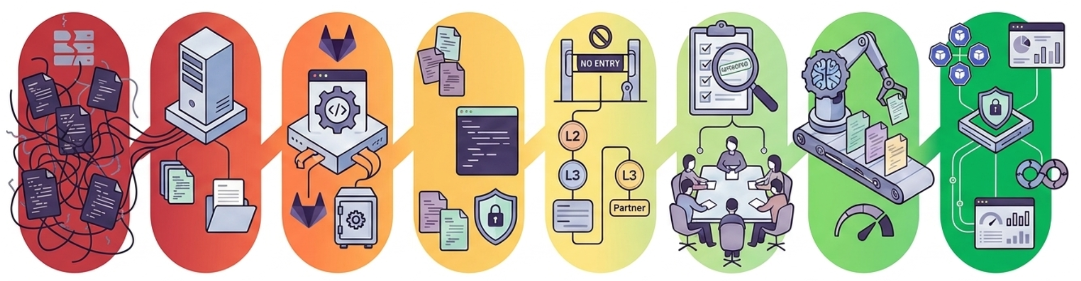
Scripting often starts with a simple promise: automate a repetitive task, save time, and let people focus on work with greater value.
At first, a script may be written by one person for one specific need. It runs from a server, does its job, and gradually becomes part of daily operations. Then another script is added. And another. Before long, what began as a useful collection of small tools is supporting thousands of operations and objects across a large enterprise.
That is where the nature of the problem changes.
At Michelin, scripting had become essential to the daily management of our Microsoft 365 environment and to the work of our Support, Collaboration, and Workplace teams. However, our approach had not evolved at the same pace as its usage. We had reached a point where scripting could no longer be treated as a collection of individual utilities. It had to become an engineering discipline.
This article follows that journey step by step: where we started, the framework and governance we built, how AI fits in, and the platform that now runs our scripts.
When a useful tool becomes critical infrastructure
There is nothing inherently wrong with an artisanal approach at a small scale. A skilled administrator identifies a problem, writes a script, tests it, and shares it with colleagues. The result can be fast and effective.
Our historical model grew in much the same way. Scripts were developed according to the habits and experience of their authors. Documentation varied from one project to another, credentials could be managed inconsistently, and some scripts ran directly on servers whose primary purpose was not scripting.
One of those environments was linked to directory synchronization, a critical service that keeps identity information aligned between systems. Running operational scripts there created an uncomfortable situation: a faulty automation could affect infrastructure far beyond its original purpose.
As the number of scripts and users increased, five limits became clear:
- Operational risk: a script failure could affect shared or critical infrastructure.
- Security exposure: broad administrative permissions, shared credentials, and secrets embedded in code were difficult to control.
- Limited scalability: one-off implementations made a growing library difficult to maintain and audit.
- Weak traceability: without consistent version control and execution records, troubleshooting and compliance evidence required significant manual work.
- Knowledge silos: important logic was sometimes understood by only one or two people.
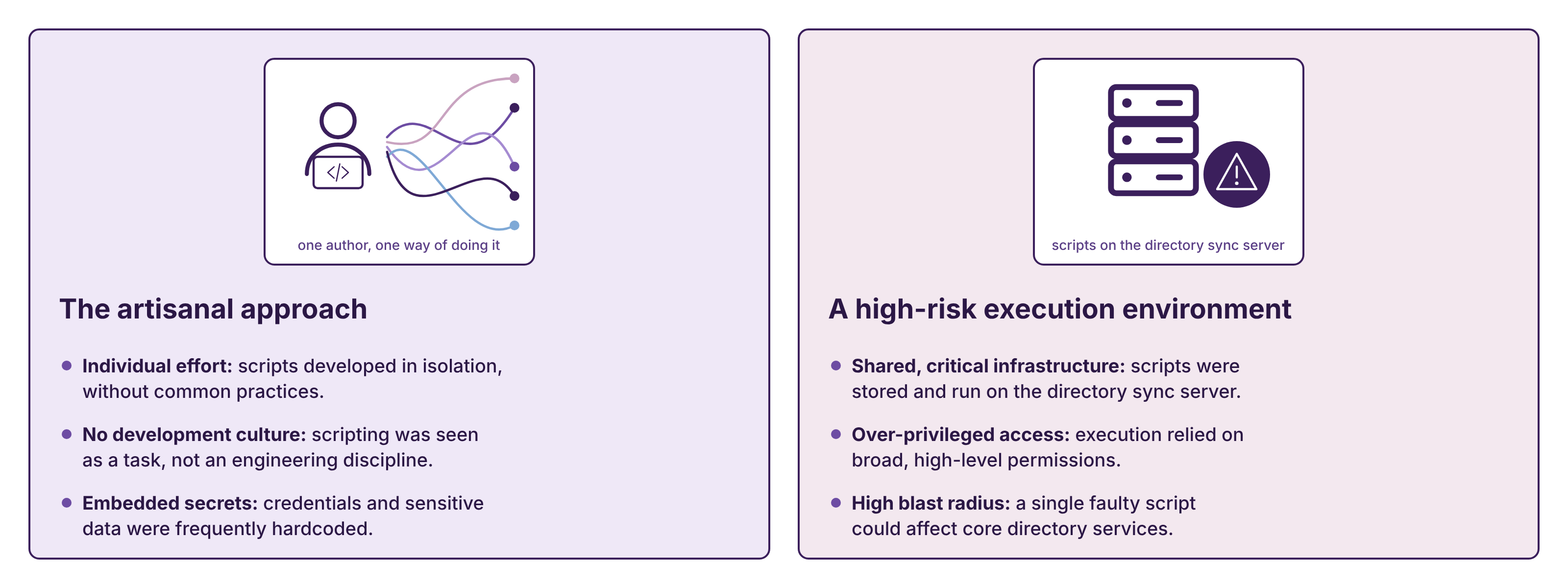
The scripts were useful. In fact, they were so useful that our reliance on them had become a risk of its own.
What do these scripts actually do?
To make this concrete, here are some of the automations our teams rely on every day:
- License management: Microsoft 365 licenses are assigned automatically through security groups, following the group-based licensing model we described in Switching from direct Microsoft 365 license assignment to group-based licensing.
- Meeting rooms: room definitions, booking access and equipment are created and maintained by script.
- Data quality: account and device records are checked and corrected continuously, so that the directory stays a reliable source of information.
- Entra ID administration: bulk updates to users, groups and attributes in Microsoft Entra ID are carried out in a controlled, repeatable way instead of by hand.
None of these is complex in itself. What makes them sensitive is scale: they run against thousands of objects, often unattended, in a production tenant.
Our first step: bring order to execution
We did not move directly from this historical model to a cloud-native platform. The journey was progressive.
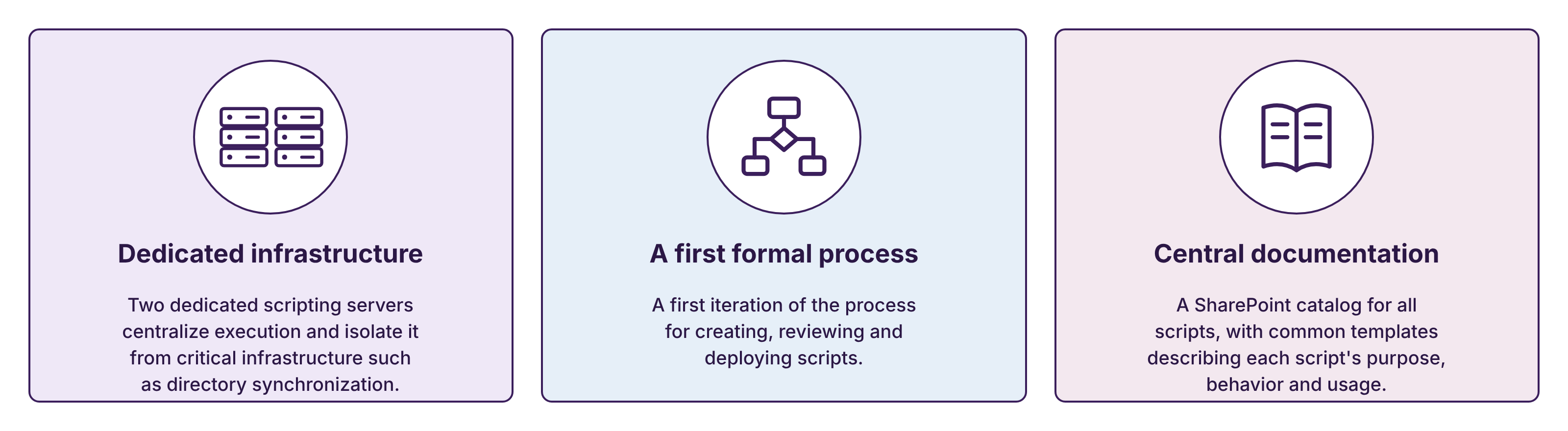
The first priority was to remove scripting activity from critical infrastructure. We deployed two dedicated scripting servers, centralizing execution in an environment designed for that purpose. This reduced the immediate blast radius of a failure and gave us a controlled foundation on which to build.
We then formalized an initial process for creating, reviewing, and deploying scripts. A SharePoint catalog brought documentation into one place, using common templates to describe each script's purpose, behavior, and usage.
These changes may appear modest compared with the target architecture described later in this article, but they addressed two fundamental questions: Where should a script run, and where can people find reliable information about it?
For the first time, the answer no longer depended mainly on knowing the right person.
Building a Scripting Factory
Dedicated servers and centralized documentation improved the situation, but they did not guarantee that two developers would build scripts in the same way. We needed a common engineering model.
We called that model the Scripting Factory.
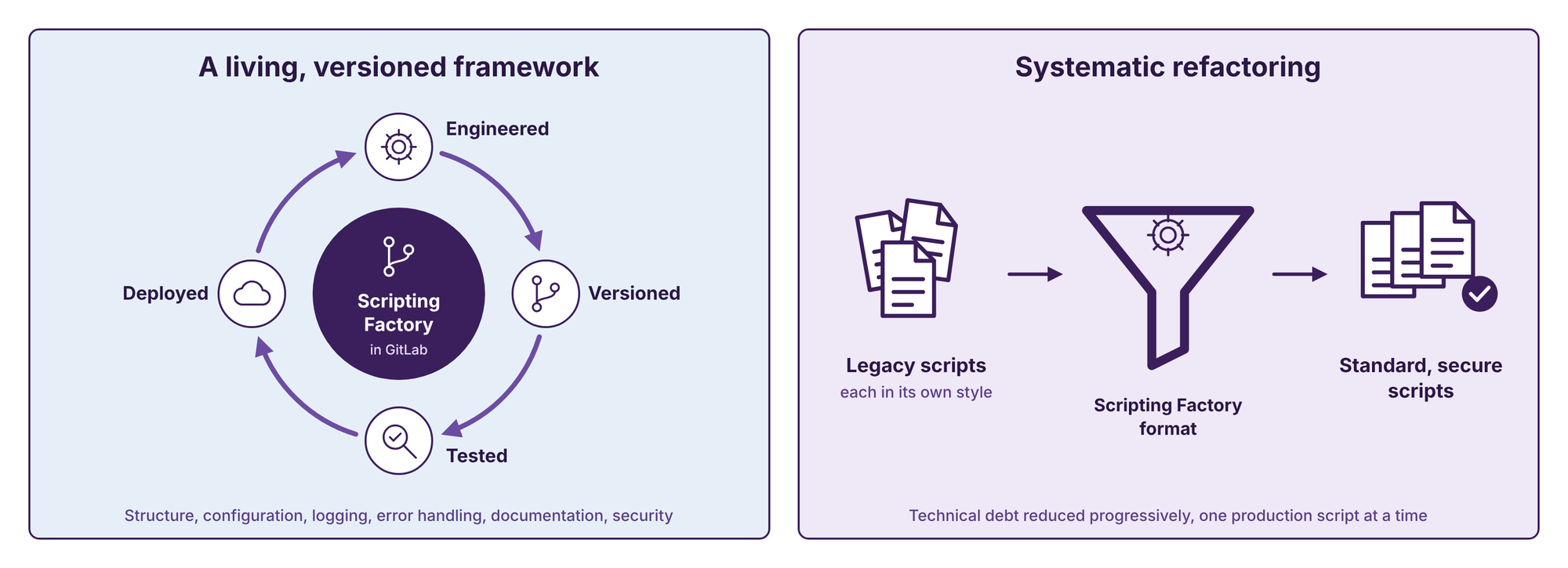
The Scripting Factory is not simply a code template. It is a living, versioned framework hosted in GitLab, Michelin's standard source-control platform. It defines the structure and capabilities expected from a production script, including configuration, logging, error management, documentation, and security practices.
The framework has its own lifecycle. New capabilities are engineered, versioned, tested, and deployed continuously. When the standard evolves, the evolution is managed like any other software product rather than distributed through informal instructions.
This created a common source of truth. Developers could focus on the business need while reusing a proven foundation for the recurring technical concerns surrounding it.
However, introducing a standard only solves the future part of the problem. Existing scripts do not become compliant by themselves. We therefore started a systematic effort to refactor legacy production scripts into the Scripting Factory format. This allowed us to reduce technical debt progressively while applying the same quality baseline across the library.
Separating the right to run from the right to change
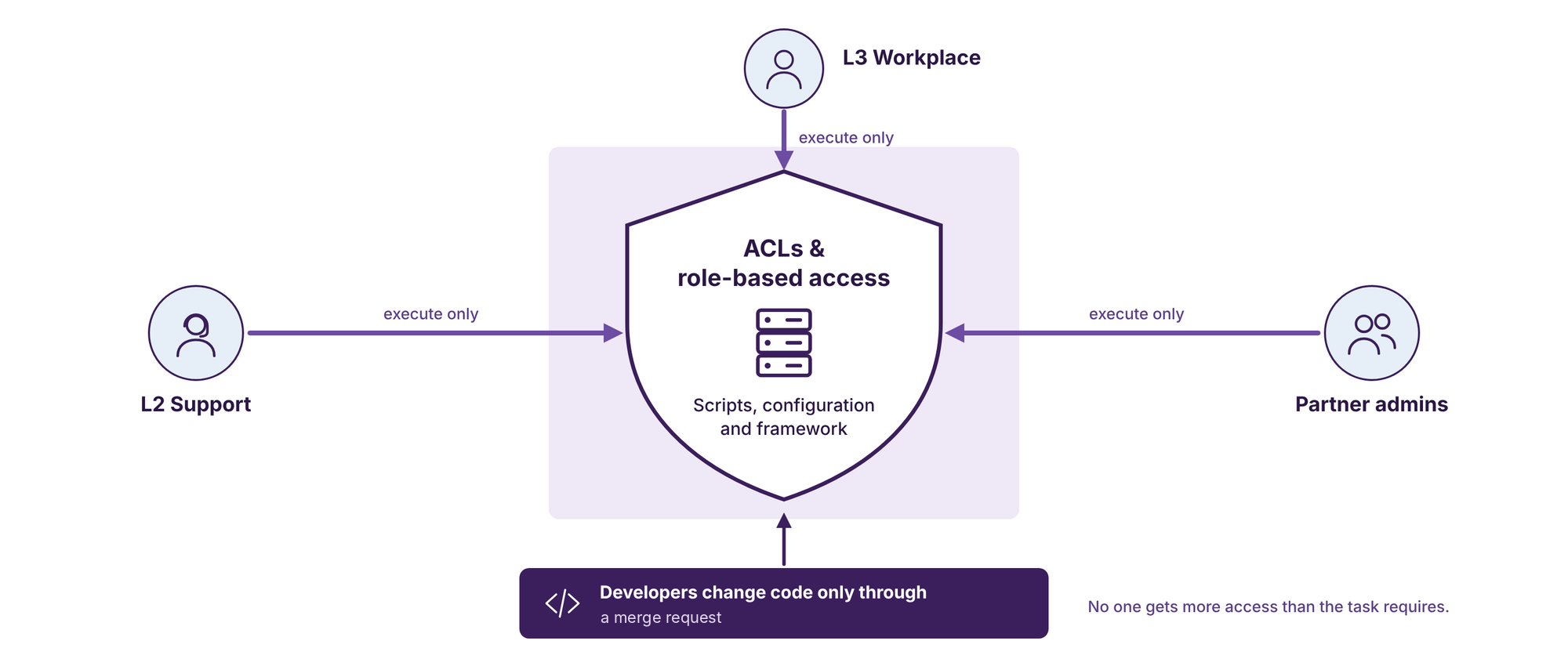
In the previous model, executing a script could require broad access to a server. In some cases, the people who needed an automation also had more technical permissions than the task itself required.
We changed this by applying the principle of least privilege: a person should receive only the access needed to perform an authorized action, and nothing more.
Access Control Lists, or ACLs, protected script files, configurations, and core framework components from unauthorized changes. We also defined execution roles for support teams, Workplace teams, and partner administrators. These users could run the scripts required for their daily work without being able to view or modify the underlying source code.
This distinction is important. An automation service should make an approved action easy to perform without turning every operator into an administrator of the platform.
The incident that accelerated governance
Every transformation has a turning point. Ours was a high-impact incident in which an automation deleted managed objects it was never meant to touch. Some of those objects did not have a simple recovery path.
The incident exposed a difficult truth: when thousands of Microsoft 365 objects are managed every day, informal peer review is not enough. A small error can have consequences at enterprise scale.
The purpose of mentioning this incident is not to focus on one mistake or one person. The lesson was systemic. If a process allows a single error to create a major impact, then the process must be redesigned.
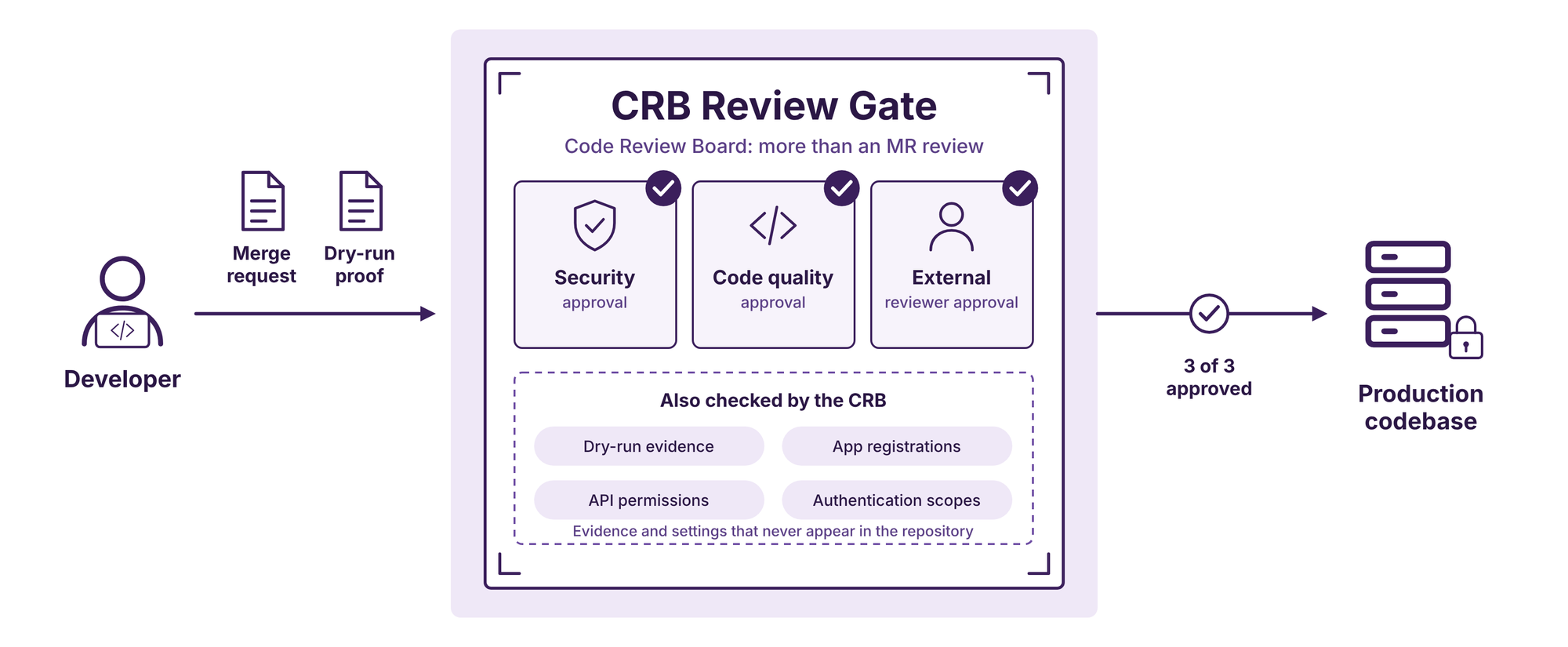
This led us to establish a Code Review Board, or CRB. It starts with a standard GitLab merge request (MR), but it goes further than a usual MR review in three ways:
- Proof, not promises: every submission must include evidence of a successful dry run, showing what the script would change before it changes anything.
- Review beyond the repository: some of the most sensitive elements of a script never appear in the code, such as app registrations, API permissions and authentication scopes. The CRB reviews these too.
- Three independent approvals: one for security, one for code quality, and one from a reviewer outside the development team.
Only code that has all three approvals can enter the production codebase. The CRB also maintains and improves the scripting standard itself, so the lessons from each review are fed back into the framework.
Governance, in this context, is not an administrative layer added after development. It is part of how the software is developed.
Spec-driven development, assisted by AI
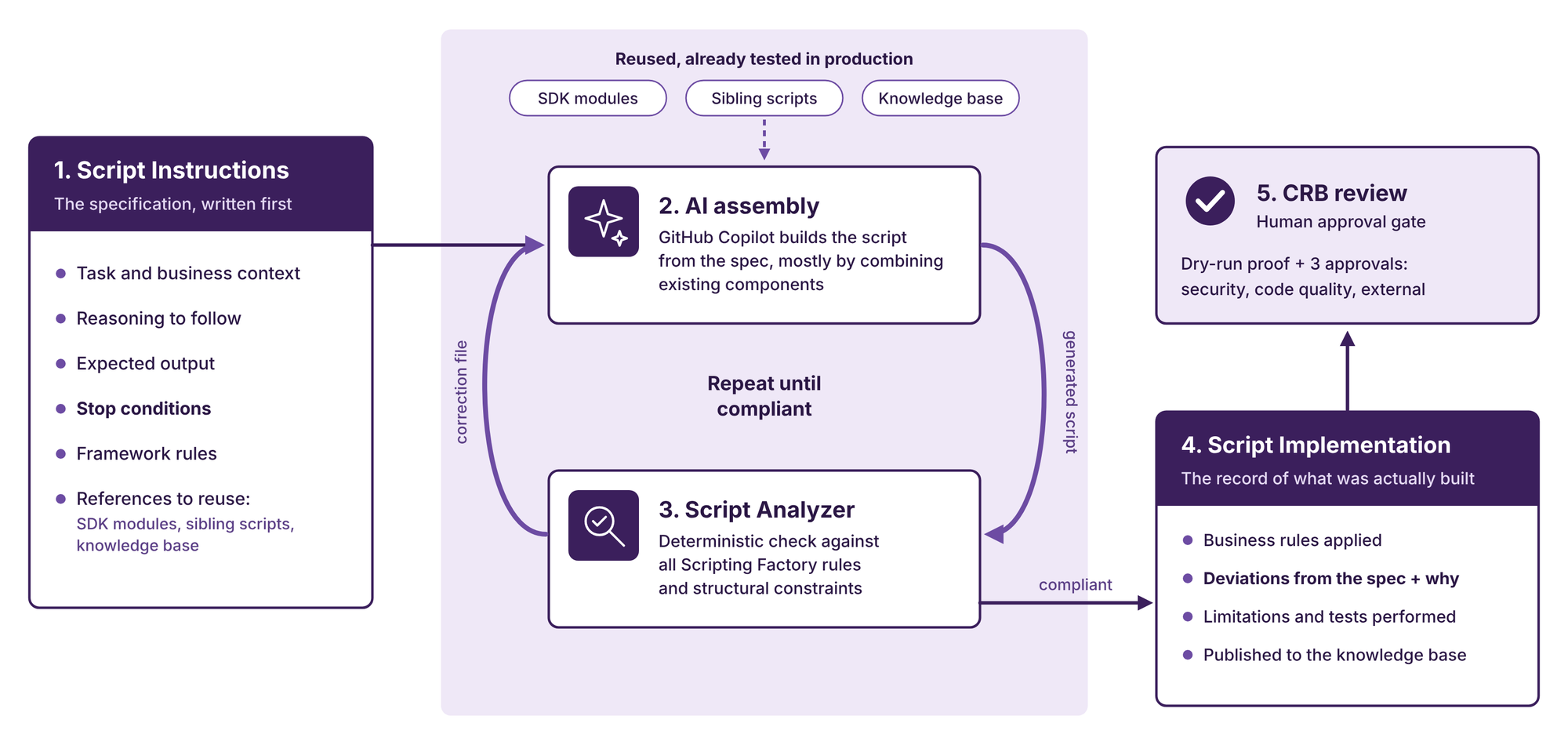
Generative AI can speed up script creation, but asking an assistant to "write a script" is not an engineering process. Our approach is spec-driven: every script starts from a written specification, and every implementation is checked against it.
When a developer starts a new script, a form in the Scripting Factory produces a structured Script Instructions file. It covers the task and its business context, the reasoning to follow, the expected output, explicit stop conditions, and the framework rules that apply. The file also points to tested building blocks: SDK modules for authentication, Exchange Online, Microsoft Graph, logging and reporting, sibling scripts from the same domain, and the team's knowledge base on the subject.
As a result, most new scripts invent very little. They put together capabilities that already run in production. GitHub Copilot does that assembly, a deterministic Script Analyzer checks the result against the framework's rules, and any deviation is sent back for correction.
The second half of the contract is a Script Implementation record. It describes what was actually built: the business rules applied, the inputs and outputs, the known limitations, the testing performed, and every deviation from the original specification, with the reason for it. Generated documentation is built from this record and published back to the knowledge base automatically.
The CRB then reviews the result like any other change. The objective is not to remove engineers from the process. It is to help them spend less time reproducing standard structures and more time validating intent, risk, and business behavior.
Example: modifying meeting rooms
Here is a condensed version of the specification behind one of the meeting-room scripts.
script:
  name: roomsmodification
  environment: Production
  csv_required: false

role: >
  PowerShell expert using the Scripting Factory framework.
  Favor readable, object-oriented code and minimize API calls.

task:
  description: Modify existing meeting rooms on the tenant
  actions:
    - change_access_type: [Public, Restricted, RestrictedApproval]
    - toggle_mtr_status: assign or remove the Microsoft Teams Rooms license

context: >
  Complements the existing room creation and deletion scripts.
  Targets rooms that already exist as resource mailboxes.

reasoning:
  - Identify each room and validate its current state before any change
  - Apply access type and MTR status independently, only when requested
  - Reuse the license assignment logic of the room creation script

output:
  per_room:
    - dimensions_updated
    - previous_value
    - new_value
    - status: [OK, PARTIAL, ERROR]

stop_conditions:
  on_failure: report the room and continue with the batch
  rules:
    - room does not exist on the tenant
    - requested access type is not supported
    - no MTR license available
  no_op: room already in the requested state

framework:
  standard: Scripting Factory
  enforce: [coding_standards, error_handling, logging, design_patterns]
  deviations_allowed: false

references:
  sibling_scripts: [roomscreation]
  sdk_modules: [O365ServicesModule]
  knowledge_base: Rooms
From shared servers to isolated execution
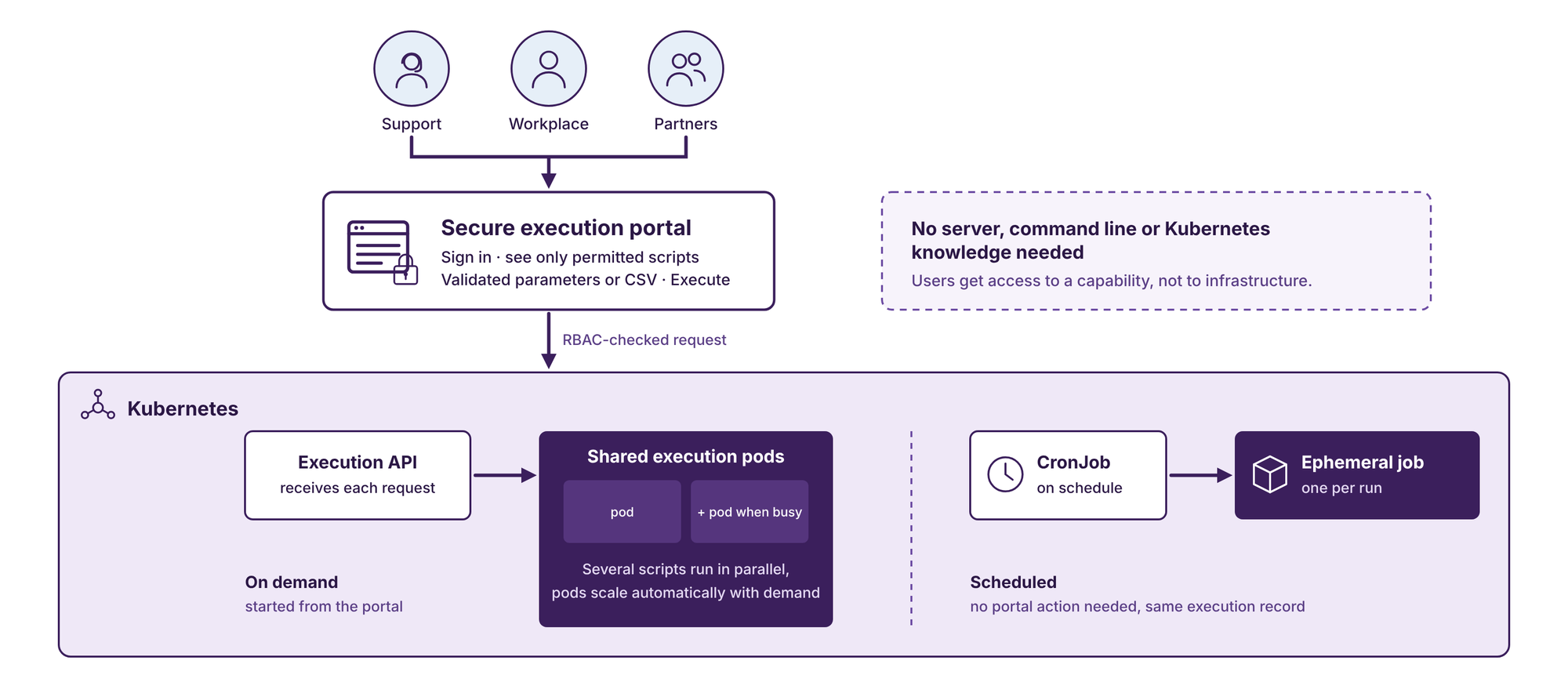
Standardized code still needs a standardized runtime. Our target architecture moves execution from long-lived shared scripting servers to Kubernetes, the container orchestration platform already used at Michelin for many production workloads.
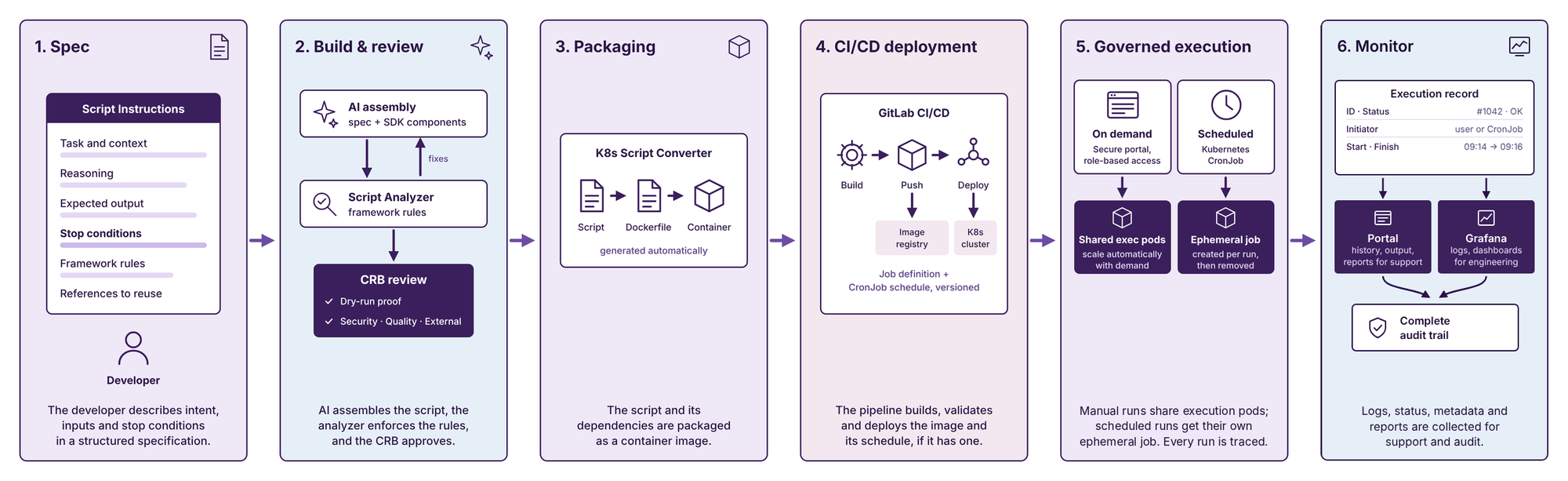
The lifecycle is designed as a continuous flow:
- Define the intent: a developer describes the automation, its inputs and its stop conditions in a structured specification.
- Assemble and validate: AI assembles the script from the specification and existing SDK components, the Script Analyzer enforces compliance, and the CRB approves the merge request.
- Package: an automated converter creates the files required to run the script as a container.
- Deploy: GitLab Continuous Integration and Continuous Delivery, commonly known as CI/CD, builds, validates, stores, and deploys the container image.
- Execute: an authorized user starts the automation on demand through a secure portal, or a Kubernetes CronJob runs it on a schedule.
- Monitor: logs, status, execution metadata, and generated reports are collected for support and audit.
Scripts run in one of two modes. Scripts started on demand run on a shared pool of execution pods that expose an API. Scheduled scripts run as ephemeral Kubernetes jobs created by a CronJob: an isolated environment is created for each run and removed when it finishes.
Containerization also makes the runtime repeatable. The script is packaged with the dependencies it needs, reducing differences between development, validation, and production environments.
Making secure automation simple to use
A platform can be technically robust and still fail if people find it too difficult to use. The visible part of our target ecosystem is therefore a secure execution portal.
An authorized user signs in, sees only the scripts permitted for their role, provides the required parameters or a structured CSV file, and selects Execute. The portal sends the request to the execution API, which runs the script on the shared execution pods. No server connection, command-line access, or Kubernetes knowledge is required.
Role-Based Access Control, or RBAC, determines which scripts each person can see and run. This enforces separation of duties automatically and replaces direct infrastructure access with access to a specific business capability.
Standardized inputs also reduce operational errors. Instead of editing commands manually, users provide values through a controlled interface. The platform can validate those values before execution and present the action in language that is meaningful to its intended users.
This is what we mean by Automation as a Service: a simple, accessible experience at the front, supported by security and governance at every layer behind it.
Turning a black box into an observable service
In a traditional scripting environment, a common support question is deceptively simple: What happened when the script ran?
Answering it may require connecting to a server, locating the right file, interpreting unstructured output, and identifying which person or scheduled task initiated the operation. Our target model captures that information by design.
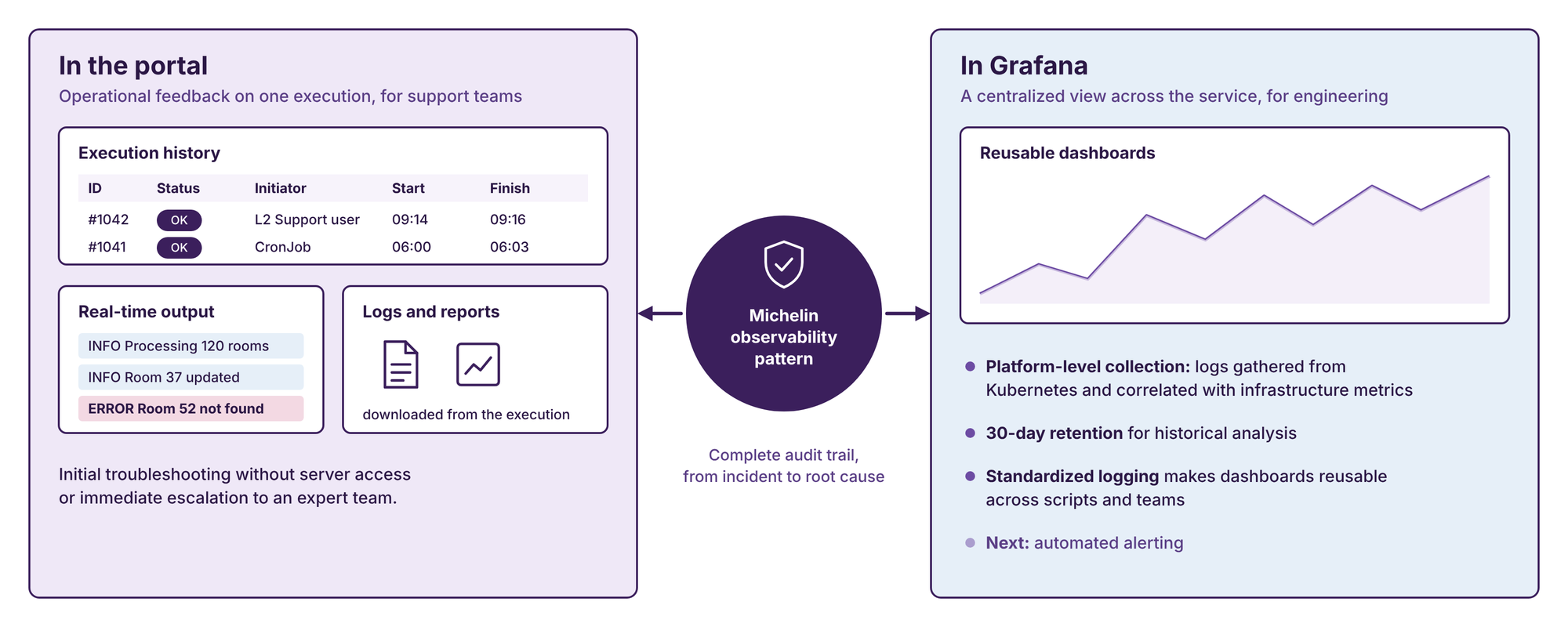
For every execution, whether started from the portal or by a schedule, the platform records its unique identifier, status, initiator (a user or a CronJob), start time, and finish time. Authorized users can retrieve logs and generated reports directly from the execution history. Real-time output distinguishes informational messages from errors, helping support teams perform initial troubleshooting without server access or immediate escalation to an expert team.
At platform level, logs are collected from Kubernetes and forwarded to Grafana in alignment with the Michelin observability pattern. Standardized logging enables reusable dashboards, historical analysis, and, in the future, automated alerting.
This provides two complementary views:
- the portal gives users operational feedback for a specific execution;
- the observability platform gives engineering teams a centralized view across the service.
The result is a complete audit trail and a much clearer path from an incident to its root cause.
What this transformation changes
The most visible change is architectural: shared servers are replaced by portal-driven, isolated execution. The deeper change is cultural. Scripts are no longer treated as secondary utilities. They are developed, reviewed, deployed, operated, and monitored as production software.
This model is designed to provide five outcomes:
- Velocity and agility: reduce the time between a business request and production-ready automation by reusing tested components instead of writing everything from scratch.
- Quality and reliability: use standardized and validated scripts to reduce incidents and accelerate troubleshooting.
- Security and compliance: build least privilege, traceability, and auditability into the architecture.
- Scalability: support a growing automation portfolio without weakening governance.
- Sustainability: centralize reusable components and automate documentation to limit technical debt over time.
The transformation is not about adding controls for their own sake. Good industrialization should make the safe path the easiest path: easier for developers to produce compliant code, easier for reviewers to assess it, easier for users to run it, and easier for support teams to understand what happened.
The next stage of the journey
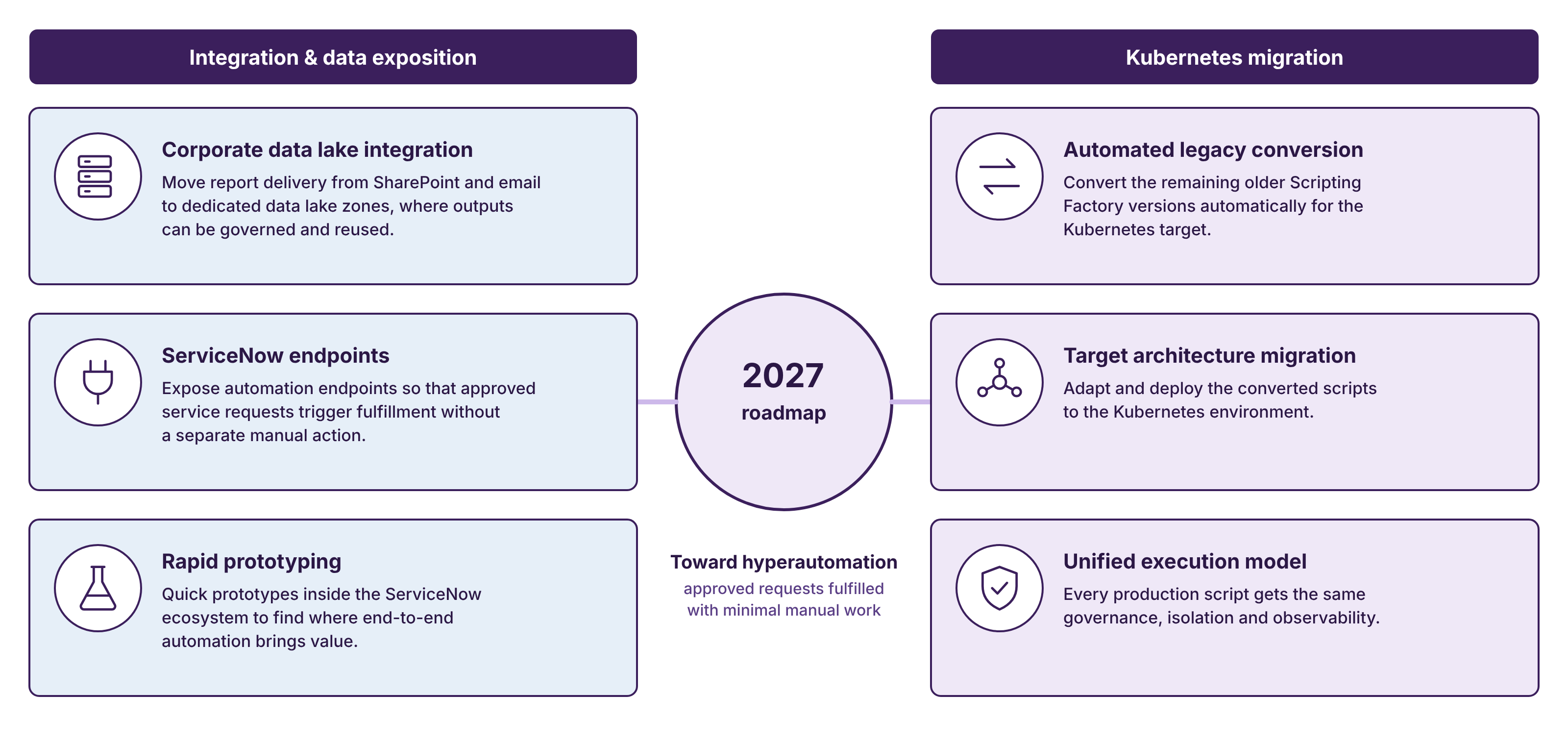
Our 2027 roadmap extends the ecosystem in two directions.
The first is integration and data exposition. Today, some reports are distributed through SharePoint or email. We want to make selected outputs available in dedicated zones of Michelin's corporate data lake, where they can be governed and reused more effectively. We also plan to expose automation endpoints to ServiceNow so that approved service requests can trigger fulfillment without requiring a separate manual action.
The second is the completion of our Kubernetes migration. We are working toward automated conversion of the remaining legacy Scripting Factory versions, followed by adaptation and deployment to the target environment. The objective is a unified execution model in which every production script benefits from the same governance, isolation, and observability.
We are also exploring rapid prototypes inside the ServiceNow ecosystem to identify where additional end-to-end automation could bring value. This is the beginning of what is often called hyperautomation: connecting workflows, automation services, and data so that an approved request can be fulfilled with minimal manual intervention.
Conclusion
Michelin's scripting journey began with talented individuals solving immediate operational problems. That approach delivered value for years, but success changed the scale of the challenge. As scripts became critical to daily operations, relying on individual practices and shared infrastructure was no longer sufficient.
Our response was progressive: isolate execution, standardize development, govern changes, use AI within a spec-driven process, and run everything on a secure, observable platform.
The central lesson is simple: a script does not become reliable merely because it works once. Reliability comes from the complete system around it: how its intent is defined, how its code is produced and reviewed, how it is deployed, who may run it, where it executes, and what evidence remains afterward.
By treating scripting with the same rigor as application development, we are turning a collection of useful tools into a sustainable automation capability for the enterprise.